Certificate Request via ACME and DNS in SSLmarket Application
The SSLmarket application makes your life easier when using or testing DNS. This guide covers a manual certificate request that is validated via DNS-01 and the modification of DNS records via an API. You will learn how the principle works and how to use it with supported registrars.
What is the ACME Protocol
ACME (Automatic Certificate Management Environment) is an open protocol that automates the issuance and renewal of TLS certificates. It is standardized in RFC 8555. It was originally created for the Let's Encrypt certificate authority but is now supported by commercial authorities, including DigiCert. An ACME client runs on the server, registering with the certificate authority. With commercial CAs, ACME credentials (External Account Binding) are typically used to connect the client to the customer account. The client then submits a certificate request, and the authority challenges it to prove domain control. After successful validation, the authority issues the certificate, which the client downloads and installs. Before expiration, the entire process repeats automatically, ensuring the certificate renews without administrator intervention.
Domain Validation using DNS-01 Method
One method of domain validation is DNS-01. The certificate authority provides the ACME client with a token. The client derives a value from it and places it in the TXT record of the verified domain: _acme-challenge. The authority then looks up the record in DNS, and if the value matches, the domain is verified. The advantage of DNS-01 is that the server does not need to be accessible from the internet or have port 80 open. This method also allows the issuance of a wildcard certificate (*.domain.com). If your DNS provider offers an API for record management, the ACME client can create and delete the TXT record automatically post-verification, making the entire process, including renewal, fully automatic. For this purpose, we recommend an API key with the narrowest possible permissions, ideally limited to managing DNS records of the given domain.
ACME Integration in SSLmarket Application
The SSLmarket application for Windows allows not only the creation and management of ACME credentials but also the manual issuance of a certificate via ACME and DNS-01 validation.
A manual certificate request is possible thanks to the setting of DNS records via the API to the verified domain, enabling the separation of the certificate requester from the domain itself. This is not possible with file-based validation on the web (HTTP-01). The request for the certificate issuance reaches the CA, which returns a one-time secret for the challenge and checks for its presence in the DNS zone of the validated domain. If the record is found, it completes the certificate request through ACME and issues it. The ACME client (in this case, the SSLmarket application) then saves the certificate to your computer (Windows certificate store or PFX).
This issuance option can be useful if you need a certificate for a server that is not connected to the internet or simply want PFX. It is also suitable for testing.
Supported Services with DNS API
In the first version with ACME support (1.5.0), the application offers three services for managing DNS records via the API:
- CZECHIA.COM (Zoner)
- Google Cloud DNS
- Cloudflare
The verified domain must have the nameservers of these providers (the DNS zone is hosted with them), and you must have an API key allowing manipulation of the records. We will add more providers in the future, if the project supports it and it is technically possible.
How ACME Works in SSLmarket Application
ACME is integrated into the SSLmarket application using the simple-acme project. It can perform DNS-01 validation using plugins that integrate third-party APIs. The SSLmarket application takes the necessary parameters and transfers them to the simple-acme client running in the background. For users, this is convenient and for the authors of the application, it provides an opportunity to easily use existing DNS API integrations.
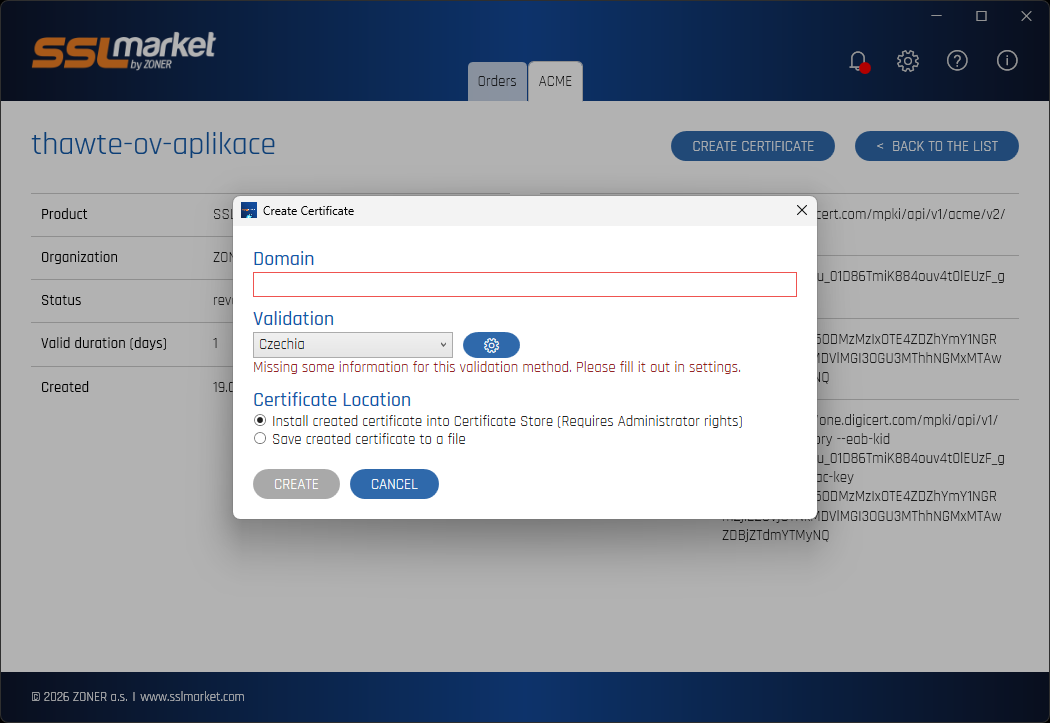
In the details of a specific ACME credential, you can directly request a certificate. You enter the domain name that must be validated via DNS, select the DNS records provider, and set where to store the issued certificate (Windows certificate store, PFX). If a functional API key for the third-party service is inserted and functional, the request will be completed after DCV verification, the certificate issued and saved according to the request settings.
You can see the status of your request in the log in front of you, making it easy to troubleshoot any issues by analyzing the log or sending it to SSLmarket customer support.
Certificates issued via ACME will appear in your SSLmarket account the next day and will be billed the following month according to the valid pricing of the customer account.
Additional Resources and Documentation
The SSLmarket application for certificate issuance via ACME integrates and uses the simple-acme project, including DNS plugins that integrate third-party services. For a reference to using individual DNS providers' APIs, I recommend the page DNS validation. Each provider has different authentication and settings, our application adopts them in the settings (frontend) and passes them to simple-acme in the background.

We are sorry that you did not find the required information here.
Please help us to improve this article. Write us what you have expected and not found out.